There’s a garage I look after that sits empty most of the week. In winter the question is always the same: is it still warm in there, or did the heating fail? The garage has WiFi, but nothing else: no server, no port forwarding, no VPN, nothing that lets me connect in. I wanted two things:
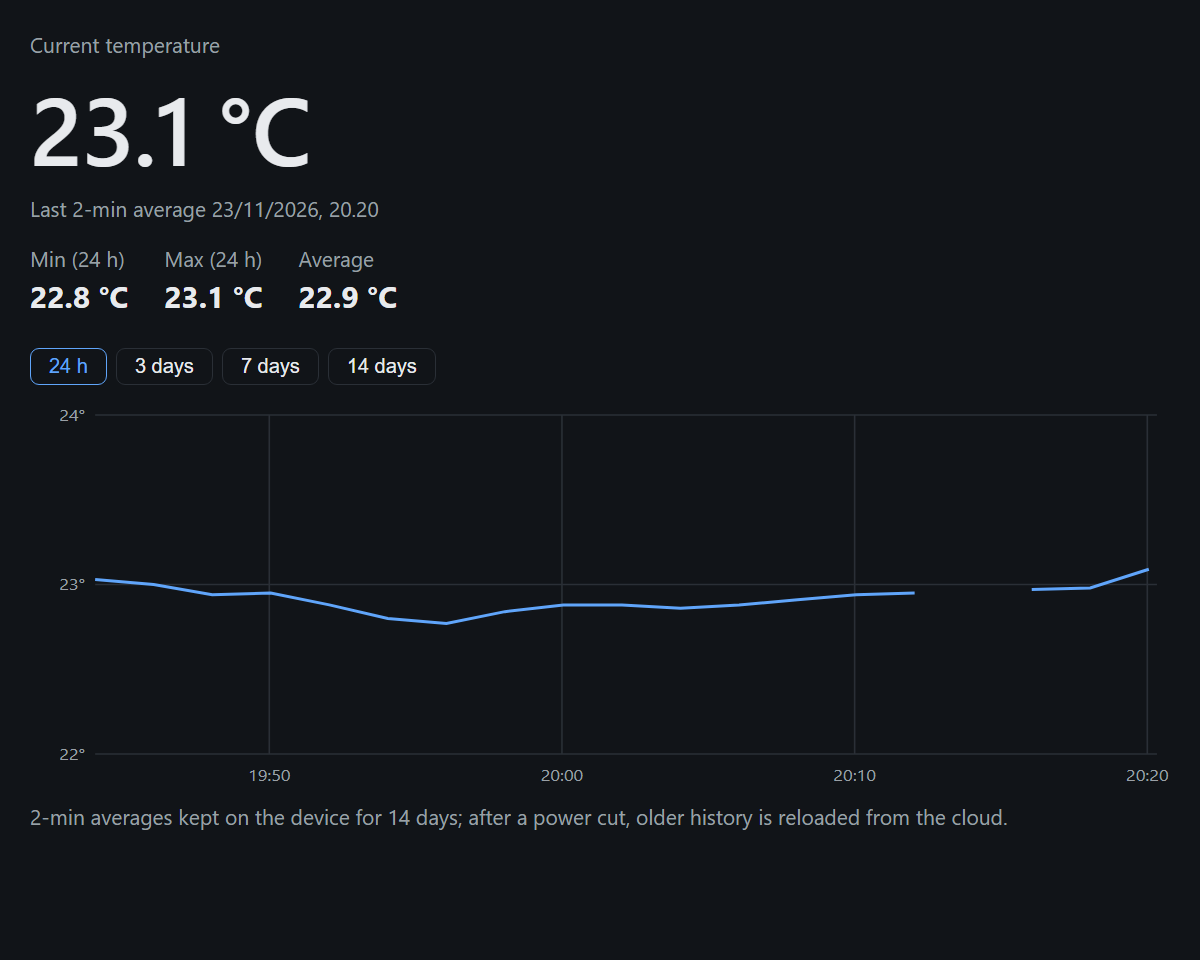
- Anyone at the garage can open a page on their phone and see the current temperature and the last two weeks, without an app or a login.
- I get the data in my own Home Assistant at home, with history and a Telegram alert if the monitor goes silent.
The solution is an ESP32 with a DS18S20 sensor running ESPHome. The board serves a read-only page on the local network and pushes its readings out to ThingSpeak, and Home Assistant reads them from there. All traffic is outgoing.
Full source: github.com/artosalminen/esp32-remote-temperature-monitor
Hardware
- An ESP32-WROOM-32 dev board (NodeMCU-32S style, CP2102 USB serial).
- A DS18S20 temperature sensor. A DS18B20 works the same way.
- A 4.7 kΩ resistor.
- A USB charger.
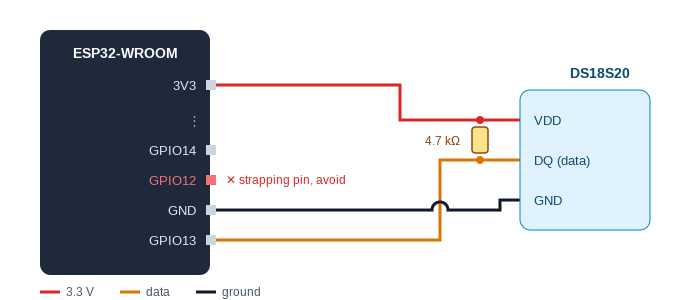
1-Wire needs the 4.7 kΩ pull-up between DATA and 3V3.
I first wired the data line to D12, the pin next to GND, because it was convenient. Don’t. GPIO12 is a strapping pin: if it’s pulled high at reset, the ESP32 switches the flash to 1.8 V and doesn’t boot, and the 1-Wire pull-up does exactly that. GPIO13 is right next to it.
How the data flows
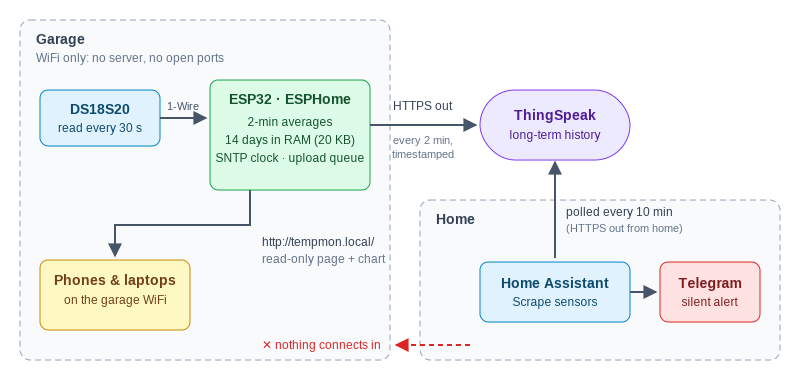
The sensor is read every 30 seconds, and four readings are averaged into one point every two minutes. Each point goes to two places: a ring buffer in the ESP32’s RAM, and ThingSpeak. Every connection is opened from the inside out: the board to ThingSpeak, and Home Assistant to ThingSpeak. Nothing ever has to reach into the garage.
The local page
ESPHome’s own web_server component shows the current value but no history, and it can expose controls. I wanted a read-only page with a chart, so the firmware registers its own handler on ESPHome’s web_server_base and doesn’t include web_server at all. With no controls, there’s nothing on the network to protect with a password.
History is a ring buffer of 16-bit values in hundredths of a degree. Two weeks at two-minute steps is 10 080 points, or 20 KB, which is fine on an ESP32 that still has about 170 KB of free heap at runtime:
static constexpr int STEP_S = 120;                      // one point per 2 min
static constexpr int HIST_N = 14 * 24 * 3600 / STEP_S;  // 14 days = 10080 points = 20 KB

struct History {
  int16_t v[HIST_N];        // °C × 100, INT16_MIN = gap
  int head{0}, count{0};
  uint32_t last_epoch{0};   // UTC time of the newest point
  int unsent{0};            // newest N points not yet accepted by ThingSpeak
  // ...
};
The page is a single HTML string with inline JavaScript that draws an SVG chart (24 h, 3 days, 7 days or 14 days) from /history.json. No external scripts, so it works even if the garage internet is down. The chart zooms to the data it has, so a board that just restarted doesn’t show a sliver of line at the edge of an empty 24-hour chart.
One thing I learned the hard way: two weeks of points is about 50 KB of JSON. Building that in one std::string on every request is asking for an out-of-memory crash, so the handler streams it in 1 KB chunks with ESP-IDF’s httpd_resp_send_chunk:
for (int i = 0; i < count; i++) {
  len += snprintf(buf + len, sizeof(buf) - len, "%s%d", i ? "," : "", value(i));
  if (len >= CHUNK) {
    if (httpd_resp_send_chunk(r, buf, len) != ESP_OK) return;  // client went away
    len = 0;
  }
}
The handler answers only while the board is connected as a WiFi client, so it never shadows the setup hotspot’s captive portal (more on that below).
ThingSpeak with real timestamps
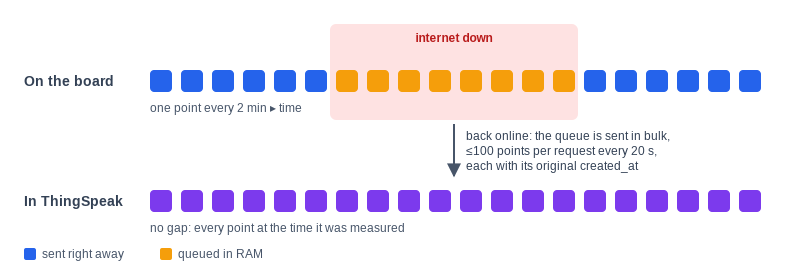
My first version sent each point with ThingSpeak’s simple update GET request. That works, but ThingSpeak stamps each entry with the time it arrives, and anything measured while the internet is down is lost.
The board syncs its clock over SNTP, so the current version uses the bulk update API instead. Every point carries its measurement time, and points that couldn’t be sent stay queued:
time:
  - platform: sntp
    id: sntp_time

interval:
  - interval: 2min
    then:
      - lambda: |-
          auto now = id(sntp_time).now();
          tempmon::commit(now.is_valid() ? (uint32_t) now.timestamp : 0);

  - interval: 20s
    then:
      - if:
          condition:
            lambda: |-
              if (!wifi::global_wifi_component->is_connected()) return false;
              id(ts_body) = tempmon::build_upload("${ts_key}", id(rssi).state);
              return !id(ts_body).empty();
          then:
            - http_request.post:
                url: "https://api.thingspeak.com/channels/${ts_channel}/bulk_update.json"
                request_headers:
                  Content-Type: application/json
                body: !lambda 'return id(ts_body);'
                on_response:
                  then:
                    - lambda: |-
                        if (response->status_code == 202) tempmon::upload_ack();
build_upload() takes the oldest unsent points, up to 100, and gives each one a created_at timestamp. Points are exactly two minutes apart, so one timestamp on the newest point dates all of them. Normally a batch holds one point. After an outage the backlog goes out 100 points every 20 seconds, and ThingSpeak ends up with no gap.
ThingSpeak’s free tier allows about 8 200 messages a day. This sends 720.
Getting the history back after a power cut
The ring buffer lives in RAM, so a power cut used to wipe the page’s two weeks of history. ThingSpeak has all of it, though, so after a restart the board loads it back.
Once the clock is synced and the first new point exists, the board asks ThingSpeak for its own data in 6-hour windows, newest first, one request every 10 seconds:
https://api.thingspeak.com/channels/<id>/fields/1.csv?start=2026-11-23%2012:00:00&end=2026-11-23%2018:00:00
created_at,entry_id,field1
2026-11-23 17:52:25 UTC,6,22.88
2026-11-23 17:54:25 UTC,7,22.80
A 6-hour window is about 180 rows, roughly 6 KB, which is small enough to fetch into RAM and parse line by line. Each row lands in the ring buffer slot for its time:
inline void restore_point(uint32_t t, float value) {
  long k = lroundf((float) (hist.last_epoch - t) / STEP_S);  // age in steps from the newest point
  if (k < 0 || k >= HIST_N) return;
  if (k < hist.count) {                                       // inside what we have:
    if (hist.v[slot(k)] == GAP) hist.v[slot(k)] = to_centi(value);  // only fill gaps
    return;
  }
  for (long j = hist.count; j < k; j++) hist.v[slot(j)] = GAP;      // extend backwards
  hist.v[slot(k)] = to_centi(value);
  hist.count = k + 1;
}
Two things make it safe:
- It never overwrites what the board measured itself. Restored points only fill empty slots or extend the history backwards. The minutes the board was really off stay as a gap in the chart.
- Nothing waits for it. The page, the measurements and the uploads run normally the whole time, and the chart fills in as windows arrive. A failed request is retried three times, then that window is skipped. Covering all 14 days takes about nine minutes.
The CSV timestamps are UTC. The board’s time zone setting would make mktime interpret them as local time, so the parser converts the date to an epoch with a small days_from_civil function instead.
WiFi: two networks and a setup hotspot
The board knows two networks: the garage WiFi and my home WiFi, so I can test and update it at home before taking it over. ESPHome picks whichever it sees:
wifi:
  networks:
    - ssid: !secret remote_wifi_ssid
      password: !secret remote_wifi_password
    - ssid: !secret wifi_ssid
      password: !secret wifi_password
  ap:
    ssid: "Tempmon Setup"
    password: !secret tempmon_ap_password
    ap_timeout: 1min

captive_portal:
If neither network is found for a minute, for example because someone changed the WiFi password, the board opens a WPA2-protected hotspot. Join it with a phone and the captive portal lets you pick a new network. That’s the only way to change settings on the device, and it’s behind a password. Over-the-air updates have their own password.
Home Assistant
Home Assistant can’t reach the board, so it reads ThingSpeak instead. I don’t edit YAML in my Home Assistant, so the rest sensor was out. The Scrape integration is configured in the UI, but it reads HTML and XML, not JSON. ThingSpeak serves the same feed as XML:
https://api.thingspeak.com/channels/<CHANNEL_ID>/feeds.xml?results=1
My channel is public, so no API key is needed. For a private channel, add &api_key=<READ_API_KEY>. Then add one entity per value:
| Name | Select | Device class | Unit |
|---|---|---|---|
| Tempmon temperature | feed field1 | Temperature, state class Measurement | °C |
| Tempmon WiFi signal | feed field2 | Signal strength | dBm |
| Tempmon last measurement | feed created-at | Timestamp | – |
Scrape polls every 10 minutes by default. My first idea was to fetch results=200 and poll less often, but a sensor keeps one value per poll and Home Assistant has no UI way to import the points in between, so results=1 is all it needs. The full-resolution data stays in ThingSpeak and on the board’s own page.
Alerting
A remote sensor is only useful if you notice when it stops. A Template binary sensor helper turns on when the newest point is more than 30 minutes old:
{% set t = as_timestamp(states('sensor.tempmon_last_measurement'), none) %}
{{ t is not none and now().timestamp() - t > 1800 }}
With device class Problem and availability {{ has_value('sensor.tempmon_last_measurement') }}. Because it compares against the measurement’s own timestamp instead of a for: timer, a Home Assistant restart doesn’t reset the clock.
An automation sends a Telegram message when it turns on, and another when the monitor reports again:
triggers:
  - trigger: state
    entity_id: binary_sensor.garage_monitor_silent
    from: "off"
    to: "on"
    id: silent
  - trigger: state
    entity_id: binary_sensor.garage_monitor_silent
    from: "on"
    to: "off"
    id: back
actions:
  - choose:
      - conditions:
          - condition: trigger
            id: silent
        sequence:
          - action: telegram_bot.send_message
            data:
              entity_id: notify.my_telegram_chat
              parse_mode: plain_text
              title: "⚠️ Garage monitor silent"
              message: >-
                No temperature data since
                {{ (as_datetime(states('sensor.tempmon_last_measurement')) | as_local).strftime('%-d.%-m. %H:%M') }}.
      # ... and the "back" branch
The explicit from: "off" matters: a restart while the monitor is silent goes on → unavailable → on, and that shouldn’t send a second alert.
Gotchas
GPIO12 doesn’t boot with a pull-up. See the hardware section. If your board boot-loops or reports a flash read error after you add the resistor, this is why.
The board doesn’t enter flash mode by itself. On my NodeMCU board the auto-reset circuit doesn’t work, so the first USB flash failed with “Wrong boot mode detected (0x13)”. Hold BOOT while the flasher says Connecting... and release it when writing starts. After the first flash, updates go over WiFi.
tempmon.local “doesn’t respond”. It did. The browser had quietly switched to https://, and the board serves only plain HTTP. Type http://tempmon.local/ in full. Some Android phones don’t resolve .local names at all, so a DHCP reservation and a QR code with the IP address on the box is the most reliable option.
Windows path length. ESPHome’s ESP-IDF build failed with “Unable to create file” when the project sat in a deep temp folder. Same project, shorter path: no problem.
Result
Anyone in the garage can open the page and see the temperature and a two-week chart, and a power cut no longer erases it. I see the same data in Home Assistant at home, next to the rooms in our house, and Telegram tells me if the monitor stops reporting. The garage needs no server or open ports. Wiring, flashing and the Home Assistant setup are in the repository.